1. Home
  2. Knowledge Base
  3. Online fax
  4. Where can I view my received faxes?

Where can I view my received faxes?

Follow these steps in the control panel to view your received faxes:

    1. Go to “My products”> “Fax services”> Click on “Manage fax” next to the account number from which you want to view the received faxes
    2. Select “Inbox” in the menu on the left.
    3. You will now see a list of the received faxes. Select a fax and click “Download” to view or save it.
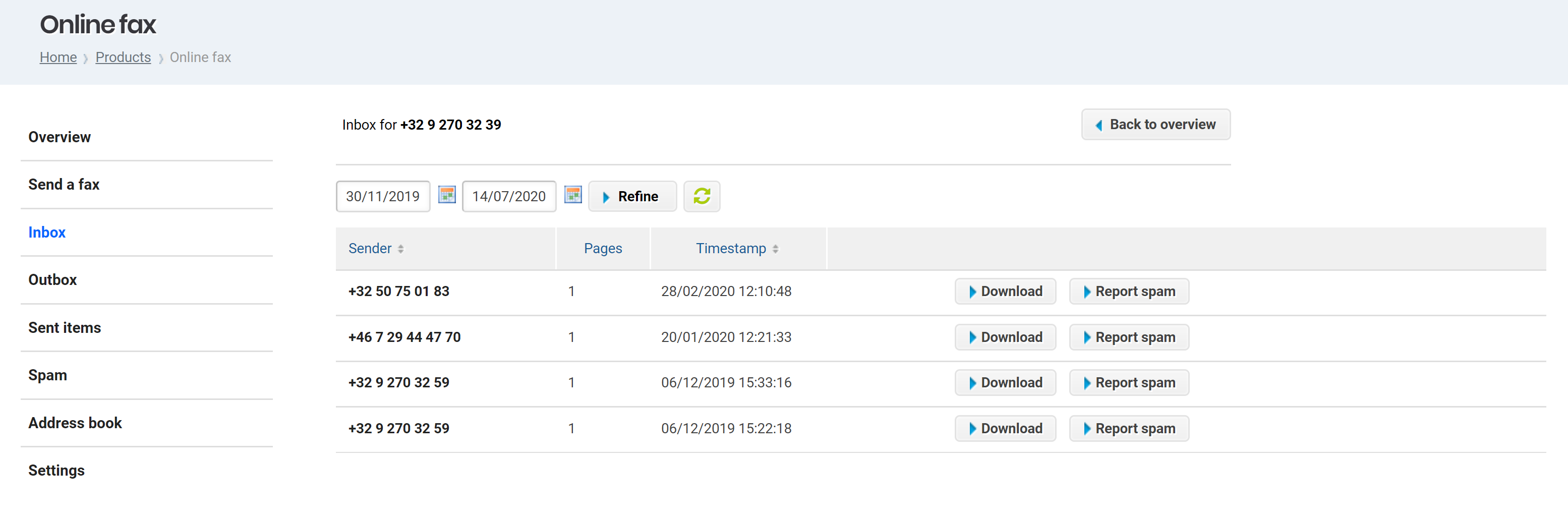
Received faxes

Updated on 14 July 2020

Was this article helpful?

Need Support?
Can't find the answer you're looking for?
Contact Support

Couldn't find a solution?

Combell support

Our specialists are available 24/7 to provide you with free support. Feel free to contact Joachim and his colleagues via e-mail or by phone.

Combell support
Joachim Coessens Specialist Support